LLM 0.32 增加推理轨迹与 OpenAI Responses 支持
Simon Willison··作者 Simon Willison
关键信息
推理模型现在会把推理轨迹输出到标准错误,而不是干扰可被管道处理的标准输出;用户可以用 -R/--hide-reasoning 关闭这一行为。此次发布还支持 GPT-5.6,将 GPT-5.6 Luna 设为 llm "prompt" 的新默认模型,并加入了通过 llm openai endpoint 对任意兼容 OpenAI 的端点进行单行提示的新命令。
资讯摘要
Simon Willison 将 LLM 0.32 称为该项目自最初发布以来最重要的新版本。这个版本的重点是提升对推理模型的可见性、增强对服务端工具的支持、扩展新模型覆盖范围,并改进日志机制,让实验和复现更容易。现在,当 LLM 面向推理模型运行时,会把它们的推理轨迹输出到标准错误流,这样用户既能看到模型的中间思考过程,又不会污染标准输出。这样做的好处是标准输出仍然可以继续通过管道传给其他工具,而用户也可以使用 -R/--hide-reasoning 关闭这项功能。此次发布还原生支持 GPT-5.6 模型家族,并把 llm "prompt" 的默认模型改成了更便宜但仍然能力不错的 GPT-5.6 Luna。
在工具支持方面,LLM 现在可以调用提供方的服务端工具,包括 OpenAI 的 CodeInterpreter 和 WebSearch。Willison 还提到 llm-anthropic 插件也有重要更新,加入了 WebSearch、WebFetch、CodeExecution 和 AnthropicMCP 支持,并展示了如何针对 datasette-mcp 插件在一次请求/响应中执行 MCP 调用。另一个新功能是 llm openai endpoint 命令,它可以在不先配置的情况下,把提示词直接发给任何兼容 OpenAI 的端点,而且这些调用不会被记录日志。除此之外,这次版本还引入了重新设计的内容寻址 SQLite 日志,继续强化 LLM 在记录和复用对话方面的能力。
资讯正文
我今天上午发布了 <a href="https://llm.datasette.io/en/stable/changelog.html#v0-32">LLM 0.32</a>,这是自该项目最初发布以来 LLM 最重要的一个新版本。这个新版本支持可见的推理轨迹、服务端提供商工具、重新设计的基于内容寻址的 SQLite 日志、新模型,以及由 OpenAI Responses API 启用的新功能。我还发布了 <a href="https://github.com/simonw/llm-anthropic">llm-anthropic 插件</a> 的新版本,其中也包含了大量更新。
LLM CLI 用户的亮点功能
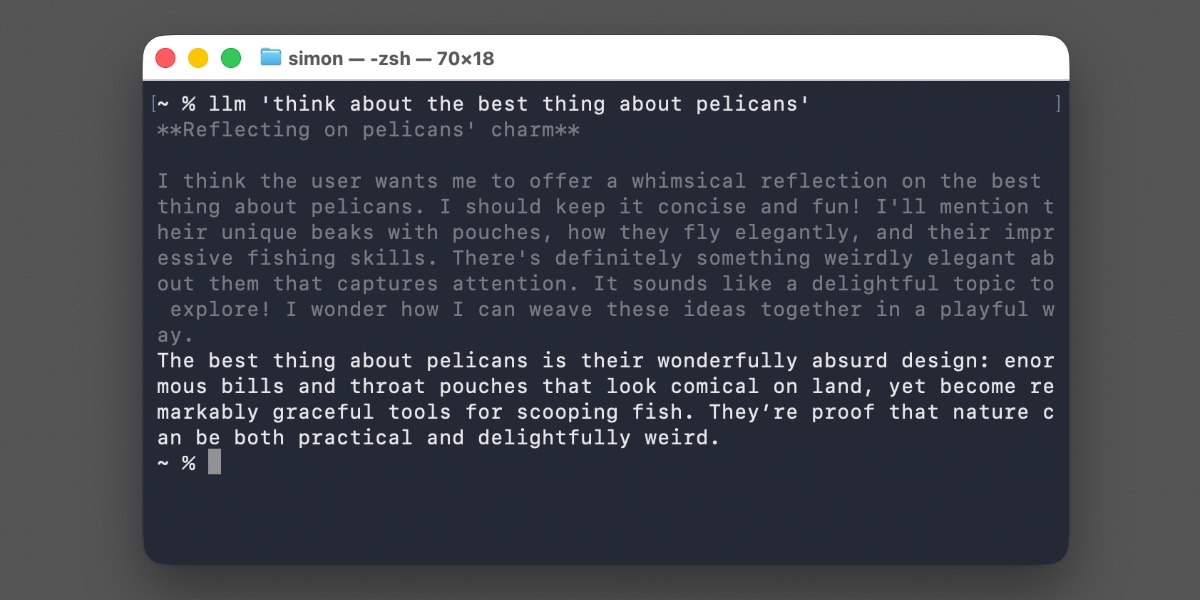
现在,使用 LLM 调用推理模型时,会将它们的<strong>推理轨迹显示到标准错误输出</strong>,这样你就可以看到它们“在想什么”,而这些信息不会被包含在标准输出中,也就不会被你管道传给其他工具。添加 <code>-R/--hide-reasoning</code> 可以关闭这一行为。
<img alt="在 macOS 终端窗口中运行 llm ‘think about the best thing about pelicans’——灰色文本输出显示 Exploring pelican qualities,随后在一段文字之后,白色段落文本输出显示:The best thing about pelicans is their wonderfully oversized, practical design: that enormous bill and pouch look comical, but they make pelicans remarkably skilled fishers. Even better, many species cooperate—working together to herd fish before scooping them up. They’re a great mix of goofy, graceful, and surprisingly clever." src="https://static.simonwillison.net/static/2026/best-pelicans.gif" />
LLM 开箱即支持<strong>GPT-5.6 模型家族</strong>,而 <code>llm "prompt"</code> 使用的新默认模型现在是价格低廉但能力出色的<strong>GPT-5.6 Luna</strong>。
LLM 调用现在可以使用来自不同提供商的<strong>服务端工具</strong>。OpenAI 提供一个<a href="https://llm.datasette.io/en/stable/openai-models.html#code-interpreter">代码执行环境</a>作为服务端工具;LLM 现在可以像这样运行能受益于此的提示:
OpenAI 还获得了一个 <a href="https://llm.datasette.io/en/stable/openai-models.html#web-search">WebSearch</a> 工具。
<a href="https://github.com/simonw/llm-anthropic">llm-anthropic</a> 插件新增了 <a href="https://github.com/simonw/llm-anthropic/blob/0.26/README.md#web-search">WebSearch</a>、<a href="https://github.com/simonw/llm-anthropic/blob/0.26/README.md#web-fetch">WebFetch</a>、<a href="https://github.com/simonw/llm-anthropic/blob/0.26/README.md#code-execution">CodeExecution</a> 和 <a href="https://github.com/simonw/llm-anthropic/blob/0.26/README.md#mcp-connector">AnthropicMCP</a>,如下所示:
“blog_blogmark” 表里有多少行?</pre></div>
<p>这会让 Anthropic 通过与其 API 的单次请求/响应交互,针对我的新 <a href="https://simonwillison.net/2026/Jul/31/stateless-mcp/#datasette-mcp">datasette-mcp</a> 插件执行 MCP 调用。</p>
<p>新的 <strong>llm openai endpoint</strong> 命令提供了一个工具,可以用一行命令对<a href="https://llm.datasette.io/en/stable/other-models.html#run-against-an-endpoint-without-configuring-it">任何 OpenAI 兼容端点执行提示词</a>。这些操作不会被记录日志,因此对于在任何说着 LLM API 世界通用语的服务上执行一次性的提示词来说,这是个很方便的工具。</p>
<p>下面是我如何借助它,对运行在本地 <a href="https://lmstudio.ai">LM Studio</a> API 中的 Gemma 4 12B 运行提示词的方法;通过 <code>uvx</code>(无需安装 LLM)来调用,并顺带混入 <a href="https://github.com/simonw/llm-tools-quickjs">llm-tools-quickjs</a> 工具插件:</p>
<div class="highlight highlight-source-shell"><pre>uvx --with llm-tools-quickjs \
llm openai endpoint http://localhost:1234/v1 -m google/gemma-4-12b \
-T QuickJS <span class="pl-s"><span class="pl-pds">'</span>Use QuickJS to multiply 3434 * 2434<span class="pl-pds">'</span></span> --td</pre></div>
<p><img alt="输出显示 Tool call: QuickJS_execute_javascript({'javascript': '3434 * 2434'}) 8358356 3434 * 2434 的结果是 8,358,356。" src="https://static.simonwillison.net/static/2026/openai-endpoint-gemma.webp" /></p>
<h4 id="new-features-in-the-python-api">Python API 中的新功能</h4>
<p>LLM 的 Python API 之前要求你先创建一个对话,然后一次发送一条消息。这种做法是对 LLM 真实工作方式的一种抽象,因为每个请求都会携带此前消息的完整历史记录。对于一些更高级的场景来说,这种抽象开始变得碍事,因此这次新版本引入了 <code>model.prompt(messages=[])</code> 参数,可以像下面这样使用:</p>
<pre><span class="pl-k">import</span> <span class="pl-s1">llm</span>
<span class="pl-k">from</span> <span class="pl-s1">llm</span> <span class="pl-k">import</span> <span class="pl-s1">user</span>, <span class="pl-s1">assistant</span>, <span class="pl-s1">system</span>
<span class="pl-s1">model</span> <span class="pl-c1">=</span> <span class="pl-s1">llm</span>.<span class="pl-c1">get_model</span>(<span class="pl-s">"gpt-5.6-luna"</span>)
<span class="pl-s1">response</span> <span class="pl-c1">=</span> <span class="pl-s1">model</span>.<span class="pl-c1">prompt</span>(<span class="pl-s1">messages</span><span class="pl-c1">=</span>[
<span class="pl-en">system</span>(<span class="pl-s">"You are a helpful pirate."</span>),
<span class="pl-en">user</span>(<span class="pl-s">"What is the capital of France?"</span>),
<span class="pl-en">assistant</span>(<span class="pl-s">"Paris, matey."</span>),
<span class="pl-en">user</span>(<span class="pl-s">"And Germany?"</span>),
<span class="pl-en">print</span>(<span class="pl-s1">response</span>.<span class="pl-c1">text</span>())</pre>
LLM 以前会针对每个提示返回一个由字符串组成的可迭代序列。这在模型返回字符串响应时效果很好,但无法预见模型后来会演变成什么奇怪的形态。如今,许多模型返回的是推理文本、输出字符串、工具调用,甚至图像附件的混合体。使用 LLM 0.32,你可以<a href="https://llm.datasette.io/en/stable/python-api.html#structured-messages-and-streaming-events">改用这种方式</a>:</p>
<pre><span class="pl-k">for</span> <span class="pl-s1">event</span> <span class="pl-c1">in</span> <span class="pl-s1">model</span>.<span class="pl-c1">prompt</span>(<span class="pl-s">"Explain cats"</span>).<span class="pl-c1">stream_events</span>():
<span class="pl-k">if</span> <span class="pl-s1">event</span>.<span class="pl-c1">type</span> <span class="pl-c1">==</span> <span class="pl-s">"reasoning"</span>:
<span class="pl-en">print</span>(<span class="pl-s">f"[thinking] <span class="pl-s1"><span class="pl-kos">{</span><span class="pl-s1">event</span>.<span class="pl-c1">chunk</span><span class="pl-kos">}</span></span>"</span>, <span class="pl-s1">end</span><span class="pl-c1">=</span><span class="pl-s">""</span>, <span class="pl-s1">flush</span><span class="pl-c1">=</span><span class="pl-c1">True</span>)
<span class="pl-k">elif</span> <span class="pl-s1">event</span>.<span class="pl-c1">type</span> <span class="pl-c1">==</span> <span class="pl-s">"text"</span>:
<span class="pl-en">print</span>(<span class="pl-s1">event</span>.<span class="pl-c1">chunk</span>, <span class="pl-s1">end</span><span class="pl-c1">=</span><span class="pl-s">""</span>, <span class="pl-s1">flush</span><span class="pl-c1">=</span><span class="pl-c1">True</span>)
<span class="pl-k">else</span>:
<span class="pl-en">print</span>(<span class="pl-s">f"Other event: <span class="pl-s1"><span class="pl-kos">{</span><span class="pl-s1">event</span><span class="pl-kos">}</span></span>"</span>)</pre>
把这些功能结合起来,我们就能<em>终于</em>提供 OpenAI chat completions 这一半标准 API 的一个稳健实现了;我现在已将其作为 <a href="https://github.com/simonw/llm-chat-completions-server">llm-chat-completions-server</a> 插件发布:
<div class="highlight highlight-source-shell"><pre>llm install llm-chat-completions-server
llm chat-completions-server --port 9000
<span class="pl-c"><span class="pl-c">#</span> Server is now running on http://127.0.0.1:9000/v1</span></pre></div>
现在,你可以通过那个服务器使用新的 <code>llm openai endpoint</code> 命令向 LLM 发送提示词了!
<div class="highlight highlight-source-shell"><pre>llm openai endpoint http://127.0.0.1:9000/v1 <span class="pl-s"><span class="pl-pds">'</span>hello<span class="pl-pds">'</span></span> -m gpt-5.4-mini</pre></div>
这类 API 更大的挑战在于日志记录。如果我们要支持这样一种模式:每次请求时消息序列都会在原有基础上追加,那么理想情况下,我们可以避免在每一轮都记录那些重复的 JSON。
解决方案是新的<a href="https://llm.datasette.io/en/stable/logging.html#the-message-store">内容可寻址消息存储</a>,其设计借鉴了 Git。你可以在<a href="https://llm.datasette.io/en/stable/logging.html#sql-schema">文档中</a>查看该格式的新 schema,不过 <code>llm logs</code> 和 <code>llm logs --json</code> 命令都已经升级,能够把这种格式转换回更易于消费的内容。
### 其余内容
这一版本还有非常多更新。<a href="https://llm.datasette.io/en/stable/changelog.html#v0-32">0.32 版本说明</a>已经相当全面,而 <a href="https://llm.datasette.io/en/stable/changelog.html#rc2-2026-07-30">0.32rc2</a>、<a href="https://llm.datasette.io/en/stable/changelog.html#rc1-2026-07-30">0.32rc</a>、<a href="https://llm.datasette.io/en/stable/changelog.html#a3-2026-06-09">0.32a3</a>、<a href="https://llm.datasette.io/en/stable/changelog.html#a2-2026-05-12">0.32a2</a> 和 <a href="https://llm.datasette.io/en/stable/changelog.html#a0-2026-04-28">0.32a0</a> 的说明应当能够补足任何遗漏。
现有的 LLM 插件都应继续正常工作,但提供额外模型的插件需要升级到 0.32,才能完整参与新的流式事件系统。文档中有一份关于使用<a href="https://llm.datasette.io/en/stable/plugins/advanced-model-plugins.html#structured-messages-and-streaming-events">结构化消息和流式事件</a>实现插件的指南。
我还更新了自己的一些插件:
<li>
<a href="https://github.com/simonw/llm-anthropic/releases/tag/0.26">llm-anthropic 0.26</a> 增加了对 Claude 5 系列模型的支持,以及 <code>WebSearch</code>、<code>WebFetch</code>、<code>CodeExecution</code> 和 <code>AnthropicMCP</code> 服务器端工具。</li>
<li>
<a href="https://github.com/simonw/llm-gemini">llm-gemini</a>、<a href="https://github.com/simonw/llm-openrouter">llm-openrouter</a> 和 <a href="https://github.com/simonw/llm-mistral">llm-mistral</a> 也快完成了,发布即将到来。</li>
### 我想 LLM 现在算是一个 agent 框架了
这次版本中相当多较底层工具的改动,都是为了满足 <a href="https://agent.datasette.io/">Datasette Agent</a> 的需求。当我刚开始做 LLM 时,“agent”这个词的定义非常模糊,以至于我拒绝使用它。到了 <a href="https://simonwillison.net/2025/Sep/18/agents/">2025 年 9 月</a>,我开始认为“<strong>LLM agent 会在循环中运行工具以实现目标</strong>”这一说法现在已经足够确立,因此我可以不再回避这个术语了。
工具链现在可以<a href="https://llm.datasette.io/en/stable/python-api.html#python-api-tools-pause">暂停以等待人工批准</a>,也可以<a href="https://llm.datasette.io/en/stable/python-api.html#python-api-tools-resume">从已存储的消息历史中恢复</a>——这两项都是 Datasette Agent 所需要的。
看着如今的 LLM,它在我眼里越来越像是“agent”形态了。能有一个 CLI 工具,把来自不同来源的不同工具与不同模型混搭起来,并且只用一行命令就能完成,这件事本身就很巧妙;而且它还包括一个足够强大的 Python 库,能够构建像 <a href="https://agent.datasette.io/">Datasette Agent</a> 和 <a href="https://github.com/simonw/llm-coding-agent">llm-coding-agent</a> 这样的系统。
也许下一版 LLM 会把“agent”这一概念直接内建进核心库。我自己也还在努力弄清楚那会是什么样子。
Tags: <a href="https://simonwillison.net/tags/projects">projects</a>, <a href="https://simonwillison.net/tags/releases">releases</a>, <a href="https://simonwillison.net/tags/ai">ai</a>, <a href="https://simonwillison.net/tags/openai">openai</a>, <a href="https://simonwillison.net/tags/generative-ai">generative-ai</a>, <a href="https://simonwillison.net/tags/llms">llms</a>, <a href="https://simonwillison.net/tags/llm">llm</a>, <a href="https://simonwillison.net/tags/anthropic">anthropic</a>, <a href="https://simonwillison.net/tags/llm-tool-use">llm-tool-use</a>, <a href="https://simonwillison.net/tags/llm-reasoning">llm-reasoning</a>, <a href="https://simonwillison.net/tags/model-context-protocol">model-context-protocol</a>
来源与参考
收录于 2026-08-06