LLM 0.32a0 引入重大重构并保持向后兼容
Simon Willison··作者 Simon Willison
关键信息
新模型将提示视为消息序列(例如用户/助手角色),并将响应视为不同类型部分的流,与 OpenAI 的聊天补全 API 等当前接口一致,同时通过向后兼容性保留旧代码行为。
资讯摘要
西蒙·威尔森发布了 LLM 0.32a0,这是他广受欢迎的用于与大型语言模型交互的 Python ��的重大 alpha 更新。此前该库将提示和响应视为简单的文本字符串,但此版本现在将输入建模为一系列对话消息,将输出建模为不同类型的组成部分流——如文本、图像或 JSON。这一变化反映了现代大模型的实际工作方式,尤其是在基于聊天的界面中。
尽管进行了这些根本性变更,该版本仍保持向后兼容性,因此现有代码无需修改即可继续运行。更新还支持附件(图像、音频)、结构化输出模式和工具调用等功能——这些都是当今高级 LLM 使用的关键特性。这使得 LLM 更能适应不断演进的模型能力。
资讯正文
我刚刚发布了 LLM 0.32a0,这是我的 LLM Python 库和 CLI 工具的首个测试版本,用于访问大语言模型(LLM)。这个版本包含了一些我酝酿已久的重要变更,这些变更在保持向后兼容的前提下进行了重构。
之前的 LLM 版本将世界建模为提示(prompt)和响应(response)的关系:向模型发送一段文本提示,然后得到一段文本响应。
import llm
model = llm.get_model("gpt-5.5")
response = model.prompt("法国的首都是哪里?")
print(response.text())
这种设计在我于2023年4月开始开发该库时是合理的。但自那以来,情况已经发生了很大变化!
LLM 通过其插件系统抽象了数千种不同的模型。最初的抽象方式——输入文本并返回文本输出——已无法满足我所需的所有功能。
随着时间推移,LLM 本身逐步增加了对图像、音频和视频输入的支持(称为“附件”),随后引入了结构化 JSON 输出的“模式”(schemas),再后来支持了工具调用(tools)执行。与此同时,LLM 自身也在持续演进,增加了推理能力,并能返回图像及其他各种有趣的功能。
LLM 必须随之进化,以更好地处理当今前沿模型所能处理的多样化的输入与输出类型。
0.32a0 测试版有两个关键改进:模型输入现在可以表示为一系列消息,而模型响应则可由多种类型的片段组成,形成流式输出。
提示作为一系列消息
虽然 LLM 接受的是文本输入,但从 ChatGPT 展示双方向对话界面的价值以来,最常见的提示方式就是把输入当作一系列对话轮次。
第一轮可能如下所示:
user: 法国的首都是哪里?
assistant:
(然后模型会填充助手的回答)
但后续每一轮都需要重放整个对话历史,就像剧本一样:
user: 法国的首都是哪里?
assistant: 巴黎
user: 德国的首都是哪里?
assistant:
大多数主流厂商的 JSON API 都遵循这一模式。以下是使用 OpenAI 的聊天补全 API 实现上述内容的样子,该接口已被其他提供商广泛模仿。
LLM 0.32a0 是一次重要的向后兼容重构
在 0.32 版本之前,LLM 将这些视为对话:
model = llm.get_model("gpt-5.5")
conversation = model.conversation()
r1 = conversation.prompt("法国的首都是?")
print(r1.text())
# 输出 "Paris"
r2 = conversation.prompt("德国?")
print(r2.text())
# 输出 "Berlin"
这种方式在从头构建与模型的对话时有效,但无法在开始时传入一段已有对话。这使得像模拟 OpenAI 的聊天补全 API 这样的任务变得比应有的难度更高。
llm 命令行工具通过使用 SQLite 持久化和还原对话的自定义机制来绕过这个问题,但这从未成为 LLM API 的稳定部分——而且很多场景下你可能希望使用 Python 库,却不想承诺以 SQLite 作为存储层。
新的 alpha 版本现在支持这一功能:
import llm
from llm import user, assistant
model = llm.get_model("gpt-5.5")
response = model.prompt(messages=[
user("Capital of France?"),
assistant("Paris"),
user("Germany?"),
print(response.text())
<p>新的 <code>llm.user()</code> 和 <code>llm.assistant()</code> 函数是专为在 <code>messages=[]</code> 数组中使用而设计的构建函数。</p>
<p>之前的 <code>prompt=</code> 选项仍然有效,但 LLM 会在后台将其升级为单元素的消息数组。</p>
<p>你还可以以替代方式对响应进行回复,而不是手动构建对话:</p>
<pre>response2 = response.reply("How about Hungary?")
print(response2) # 默认 __str__() 调用 .text()</pre>
<h4 id="streaming-parts">流式传输部分</h4>
<p>alpha 版本中的另一个主要新接口涉及从提示中流式返回结果。</p>
<p>此前,LLM 支持如下形式的流式传输:</p>
<pre>response = model.prompt("Generate an SVG of a pelican riding a bicycle")
for chunk in response:
print(chunk, end="")</pre>
<p>或者这种异步变体:</p>
<pre>import asyncio
import llm
model = llm.get_async_model("gpt-5.5")
response = model.prompt("Generate an SVG of a pelican riding a bicycle")
async def run():
async for chunk in response:
print(chunk, end="", flush=True)
asyncio.run(run())</pre>
许多当前的模型会返回多种类型的内容。例如,向Claude发送一个提示时,可能先返回推理输出,接着是文本,然后是一个用于工具调用的JSON请求,最后又是更多文本内容。
一些模型甚至可以在服务器端执行工具,比如OpenAI的<a href="https://developers.openai.com/api/docs/guides/tools-code-interpreter?lang=curl">代码解释器工具</a>或Anthropic的<a href="https://platform.claude.com/docs/en/agents-and-tools/tool-use/web-search-tool">网络搜索工具</a>。这意味着模型返回的结果可以结合文本、工具调用、工具输出以及其他格式。
多模态输出模型也开始出现,它们可以在流式响应中混合返回图像,甚至包括<a href="https://developers.openai.com/api/docs/guides/audio#add-audio-to-your-existing-application">音频片段</a>。
新的LLM alpha版本将这些内容视为一系列带类型的讯息片段。以下是作为Python API使用者时的样子:
import asyncio
import llm
model = llm.get_model("gpt-5.5")
prompt = "invent 3 cool dogs, first talk about your motivations"
def describe_dog(name: str, bio: str) -> str:
"""记录一只假设狗狗的名字和简介。"""
return f"{name}: {bio}"
def sync_example():
response = model.prompt(
prompt,
tools=[describe_dog],
for event in response.stream_events():
if event.type == "text":
print(event.chunk, end="", flush=True)
elif event.type == "tool_call_name":
print(f"\nTool call: {event.chunk}", end="", flush=True)
elif event.type == "tool_call_args":
print(event.chunk, end="", flush=True)
async def async_example():
model = llm.get_async_model("gpt-5.5")
response = model.prompt(
prompt,
tools=[describe_dog],
async for event in response.astream_events():
if event.type == "text":
print(event.chunk, end="", flush=True)
elif event.type == "tool_call_name":
print(f"\nTool call: {event.chunk}", end="", flush=True)
elif event.type == "tool_call_args":
print(event.chunk, end="", flush=True)
sync_example()
asyncio.run(async_example())
Sample output (from just the first sync example):
My motivation: create three memorable dogs with distinct “cool” styles—one cinematic, one adventurous, and one charmingly chaotic—so each feels like they could star in their own story.
Tool call: describe_dog({"name": "Nova Jetpaw", "bio": "A sleek silver-gray whippet who wears tiny aviator goggles and loves sprinting along moonlit beaches. Nova is fearless, elegant, and rumored to outrun drones just for fun."})
Tool call: describe_dog({"name": "Mochi Thunderbark", "bio": "A fluffy corgi with a dramatic black-and-gold bandana and the confidence of a rock star. Mochi is short, loud, loyal, and leads a neighborhood 'security patrol' made entirely of squirrels."})
Tool call: describe_dog({"name": "Atlas Snowfang", "bio": "A massive white husky with ice-blue eyes and a backpack full of trail snacks. Atlas is calm, heroic, and always knows the way home—even during blizzards, fog, or confusing camping trips."})
At the end of the response you can call response.execute_tool_calls() to actually run the functions that were requested, or send a response.reply() to have those tools called and their return values sent back to the model:
print(response.reply("Tell me about the dogs"))
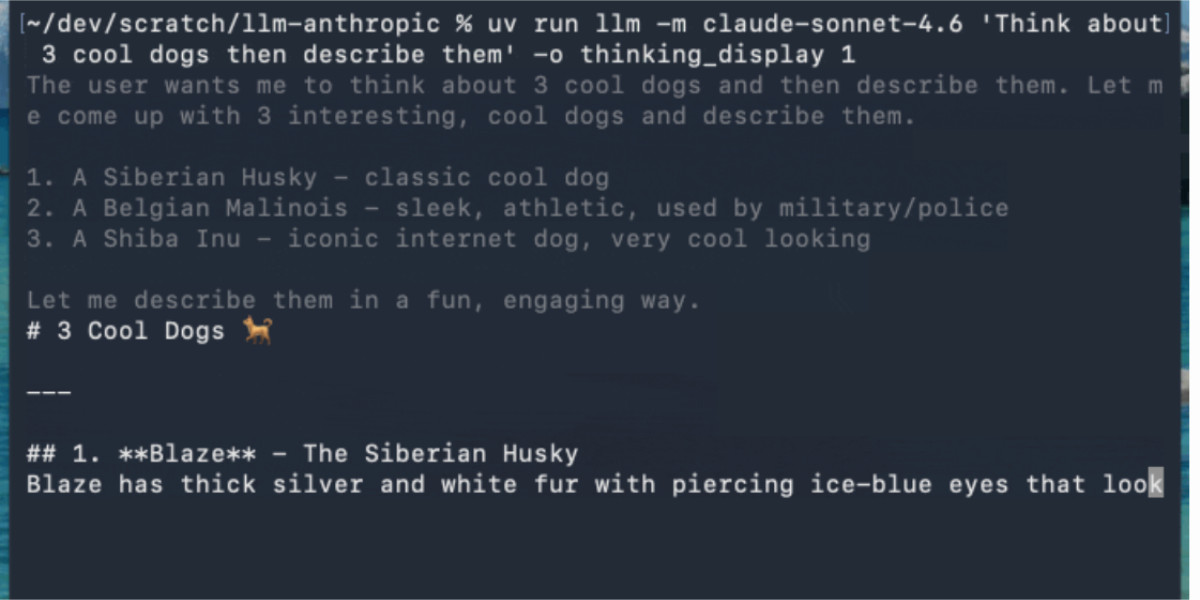
This new mechanism for streaming different token types means the CLI tool can now display "thinking" text in a different color from the text in the final response. The thinking text goes to stderr so it won't affect results that are piped into other tools.
This example uses Claude Sonnet 4.6 (with an updated streaming event version of the <a href="https://github.com/simonw/llm-anthropic">llm-anthropic</a> plugin) as Anthropic's models return their reasoning text as part of the response:
llm -m claude-sonnet-4.6 'Think about 3 cool dogs then describe them' \
-o thinking_display 1
<img alt="Animated demo. Starts with ~/dev/scratch/llm-anthropic % uv run llm -m claude-sonnet-4.6 'Think about 3 cool dogs then describe them' -o thinking_display 1 - the text then streams in grey: The user wants me to think about 3 cool dogs and then describe them. Let me come up with 3 interesting, cool dogs and describe them. Then switches to regular color text for the output that describes the dogs." src="https://static.simonwillison.net/static/2026/claude-thinking-llm.gif" />
你可以使用新的 <code>-R/--no-reasoning</code> 标志来抑制推理标记的输出。令人惊讶的是,这竟然是本次发布中唯一一个面向命令行界面的改动。
<h4 id="a-mechanism-for-serializing-and-deserializing-responses">一种序列化和反序列化响应的机制</h4>
如前所述,目前 LLM 在将对话持久化到 SQLite 时代码非常僵硬。我在 0.32a0 中新增了一种机制,应该能为使用 Python API 的用户提供一种自定义替代方案:
<pre><span class="pl-s1">serializable</span> <span class="pl-c1">=</span> <span class="pl-s1">response</span>.<span class="pl-c1">to_dict</span>()
<span class="pl-c"># serializable 是一个类似 JSON 的字典</span>
<span class="pl-c"># 可以将其存储在任何地方,然后重新加载:</span>
<span class="pl-s1">response</span> <span class="pl-c1">=</span> <span class="pl-v">Response</span>.<span class="pl-c1">from_dict</span>(<span class="pl-s1">serializable</span>)</pre>
返回的这个字典实际上是一个定义在新模块 <a href="https://github.com/simonw/llm/blob/main/llm/serialization.py">llm/serialization.py</a> 中的 <code>TypedDict</code>。
<h4 id="what-s-next-">接下来呢?</h4>
我将此版本作为 alpha 发布,以便我能升级各种插件,并在几天内于实际环境中测试这一新设计。我预计稳定版 0.32 将与这个 alpha 版本非常相似,除非 alpha 测试暴露出我在整体设计上的某些缺陷。
还有一个较大的任务尚未完成:我希望重新设计 SQLite 日志系统,更好地捕获由这一新抽象返回的更细粒度的信息。
理想情况下,我希望将其建模为一张图,以最好地支持类似 OpenAI 的聊天补全 API 场景——即同一对话会不断扩展,且每次提示都会重复使用。我希望能够在数据库中存储这些内容而不产生重复。
我还在犹豫是否应将该功能包含在 0.32 中,还是推迟到 0.33 版本再实现。
来源与参考
收录于 2026-04-30